Gradle plugin configuration
This page is the reference for configuring com.utopia-rise.godot-kotlin-jvm.
Most settings live in the godot { ... } block in build.gradle.kts.
Two related topics also live here because users usually look for them alongside plugin setup:
- custom Kotlin source directories
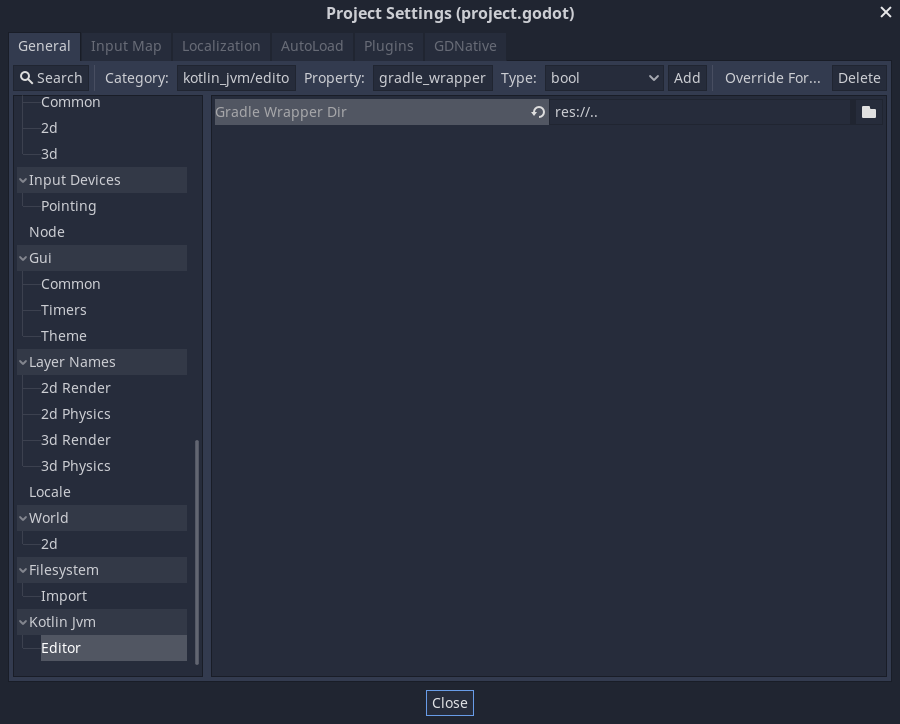
- Gradle wrapper path in the Godot editor
The plugin also works well with Gradle performance features such as parallel execution and configuration cache.
Quick example
1 2 3 4 5 6 7 8 9 10 11 12 13 14 | |
Recommended Gradle performance settings
For day-to-day project builds, these Gradle properties are a good default:
1 2 | |
These are regular Gradle settings, so they belong in gradle.properties, not in the godot { ... } block.
Build languages and toolchains
These settings control which JVM languages participate in the initial compilation pass, and which Java/Kotlin/Scala versions are used for the build.
languages
Controls which JVM source languages participate in the initial classes compilation pass.
Default:
- Kotlin
- Java
- Scala
Example:
1 2 3 4 5 | |
Effect:
compileKotlinonly runs whenKOTLINis enabledcompileJavaonly runs whenJAVAis enabledcompileScalaonly runs whenSCALAis enabled- Scala plugin/runtime wiring is only added when
SCALAis enabled
javaVersion
Configures the Java and Kotlin toolchains used for compilation.
Default:
11
Example:
1 2 3 | |
Rule:
- must be at least JDK
11
kotlinVersion
Expected Kotlin Gradle plugin version for the build.
Default:
2.3.20
Example:
1 2 3 | |
Rules:
- must be at least
2.3.20for the current Godot Kotlin/JVM release - if you keep the default, the Godot plugin applies Kotlin
2.3.20automatically - if you override it, you should also apply
org.jetbrains.kotlin.jvmexplicitly with the same version beforecom.utopia-rise.godot-kotlin-jvm
Example with explicit override:
1 2 3 4 5 6 7 8 | |
scalaVersion
Scala version used when Scala support is enabled.
Default:
3.6.3
Example:
1 2 3 | |
Rules:
- only matters when
languagescontainsGodotLanguage.SCALA - must be at least Scala
3.0.0
Godot project layout and registration output
These settings control where the plugin looks for the Godot project and where it writes .gdj registration files.
godotProjectDirectory
Directory that contains project.godot.
Default:
- the current Gradle project directory
Use this when the Gradle project lives in a subdirectory:
1 2 3 | |
registrationFilesDirectory
Base directory where newly created .gdj registration files are written.
Default:
<godotProjectDirectory>/gdj
Example:
1 2 3 | |
disableGdj
Disables .gdj registration file handling while keeping class scanning and entry generation enabled.
Default:
false
Example:
1 2 3 | |
When enabled, the plugin:
- still scans compiled user code for registered classes
- still generates entry sources/resources
- skips scanning the Godot project for existing
.gdjfiles - skips staged
.gdjgeneration - skips copying, replacing, or deleting
.gdjfiles in the Godot project
registrationFilesLayoutMode
Controls how .gdj files are laid out inside each project directory.
Values:
RegistrationFileLayoutMode.FLATRegistrationFileLayoutMode.HIERARCHICAL
Example:
1 2 3 4 5 | |
registrationFilesIndentation
Controls the indentation used inside generated .gdj files.
Values:
RegistrationFileIndentation.SPACERegistrationFileIndentation.TAB
Default:
RegistrationFileIndentation.SPACE
Example:
1 2 3 4 5 | |
registrationNameMode
Controls how default registered names are computed when @RegisterClass does not provide a custom name.
Values:
RegisteredNameMode.SIMPLE_NAMERegisteredNameMode.FQ_NAMERegisteredNameMode.PROJECT_PREFIX
Example:
1 2 3 4 5 | |
Packaging and optional runtime features
These settings affect how the project is packaged and which optional runtime helpers are added.
isLibrary
Marks the project as a reusable Godot Kotlin/JVM library instead of a runnable Godot project.
Example:
1 2 3 | |
When enabled, the plugin:
- keeps compile setup and Godot dependencies
- skips entry scanning and
.gdjgeneration for the local project - skips the runnable-project packaging flow
- leaves a regular library jar as the final artifact
Unlike disableGdj, isLibrary turns off the whole local runtime-registration pipeline rather than only the .gdj part of it.
Build tasks
The plugin adds a few higher-level tasks on top of the normal Gradle lifecycle.
fastBuild
Builds fresh desktop jars while reusing the last generated entry-registration artifacts instead of rescanning registered classes and regenerating .gdj files.
Use this when you only changed implementation details that do not affect registration structure, for example method bodies.
Example:
1 | |
Rules:
- requires a previous successful full build so the generated entry-registration jar already exists
- still recompiles the project and rebuilds
main.jar - still rebuilds and copies
godot-bootstrap.jar - keeps the registration-related tasks in the Gradle task graph, but skips executing them via
onlyIf - should not be used after adding, removing, renaming, or structurally changing registered classes, functions, properties, or signals
isGodotCoroutinesEnabled
Adds the Godot coroutine library and Kotlin coroutines dependency.
Example:
1 2 3 | |
Android build inputs
These settings matter when you invoke:
buildAndroidbuildAndroidRelease
The Android export tasks are compatible with configuration cache, so buildAndroid and lower-level Android packaging tasks can be run with --configuration-cache.
d8ToolPath
Path to the d8 executable used for dex generation.
1 2 3 | |
androidCompileSdkDirectory
Path to the Android platform directory used for compilation.
1 2 3 | |
androidMinApiLevel
Minimum Android API level passed to d8.
1 2 3 | |
GraalVM and iOS build inputs
These settings matter when you invoke:
buildGraalNativeImagebuildGraalNativeImageReleasebuildIOSbuildIOSRelease
The desktop GraalVM and iOS export tasks are also compatible with configuration cache.
graalVmHomeDirectory
Path to the GraalVM home directory.
1 2 3 | |
windowsDeveloperVcVarsPath
Windows-only path to the Visual Studio VCVARS script used by native-image builds.
1 2 3 | |
additionalGraalJniConfigurationFiles
Additional JNI configuration files passed to native-image.
1 2 3 4 5 | |
additionalGraalReflectionConfigurationFiles
Additional reflection configuration files passed to native-image.
1 2 3 4 5 | |
additionalGraalResourceConfigurationFiles
Additional resource configuration files passed to native-image.
1 2 3 4 5 | |
isGraalNativeImageVerboseEnabled
Turns on verbose mode for native-image generation.
1 2 3 | |
Related Gradle and editor configuration
These are often configured together with the plugin, but they are not godot { ... } properties.
Custom source directories
If you want Gradle to compile sources from a non-default Kotlin source directory, configure the regular Kotlin source set:
1 2 3 | |
This is standard Gradle/Kotlin source-set configuration.
Gradle wrapper path in the Godot editor
Sometimes the Godot project is nested inside a larger repository and the Gradle wrapper lives in a parent directory:
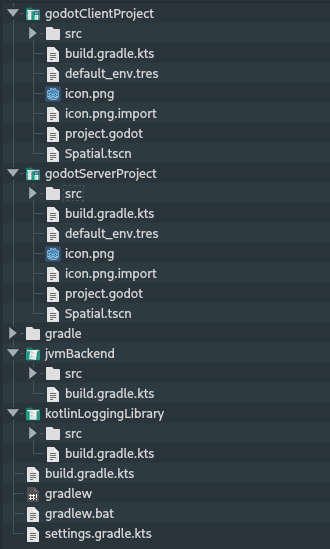
In that case, the Godot editor may not find the wrapper automatically because it only looks inside the Godot project directory.
To support that layout, set the Gradle wrapper path from the Godot project settings: