Debugging
Prerequisites
In order to debug your code using an embedded JRE, make sure to include the following modules:
jdk.jdwp.agent
Info
Example for AMD64 systems: jlink --add-modules java.base,java.logging,jdk.jdwp.agent --output jre-amd64-linux (make sure to swap linux to your platform!)
Example for ARM64 systems: jlink --add-modules java.base,java.logging,jdk.jdwp.agent --output jre-arm64-macos (make sure to swap macos to your platform!)
If you're still using the JDK installed on your system though, you don't need to do this.
Run and attach a Remote Debugger
Run your game with the command-line option --jvm-debug-port=<port (normally 5005)> and attach a remote debugger.
Info
If you specify either --jvm-debug-port or --jvm-debug-address the execution of the game will suspend until you attach a remote debugger. You can configure this behaviour by specifying --wait-for-debugger=true or --wait-for-debugger=false
Example:
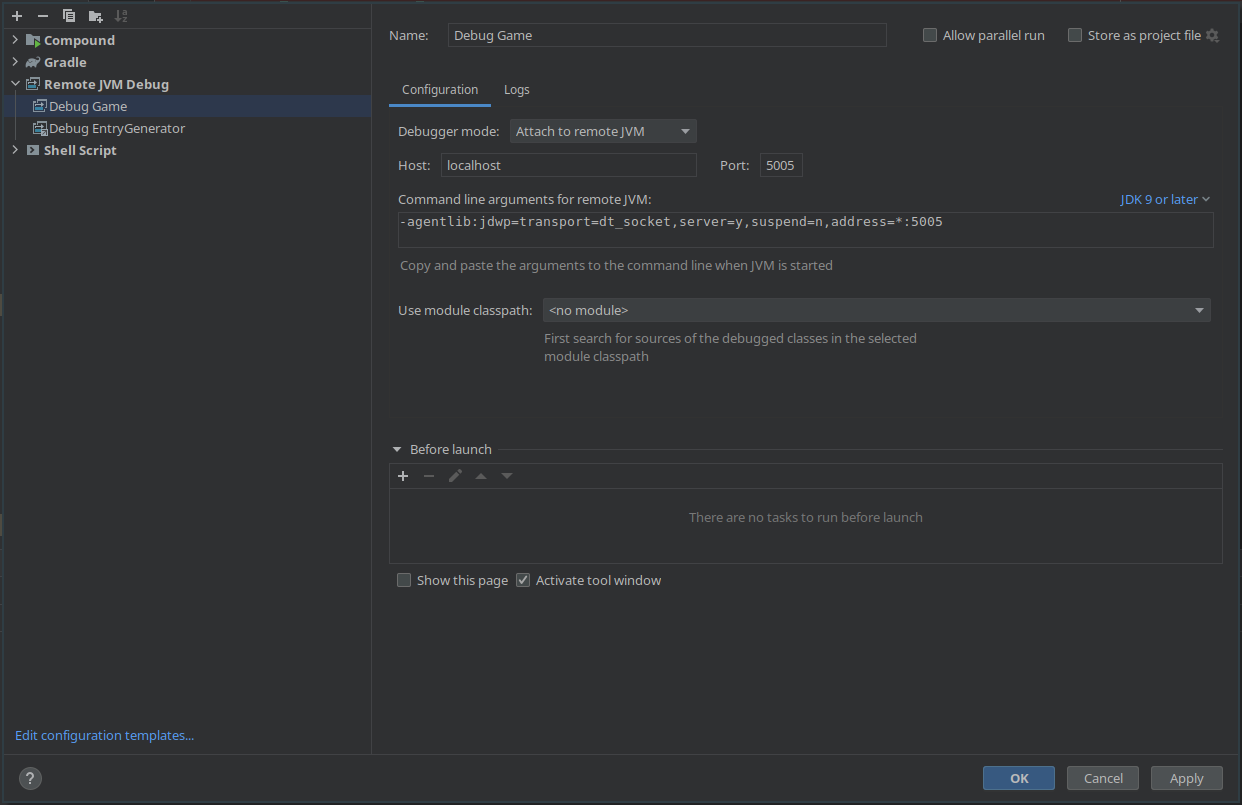
Write debug code
You can add code only for debug version of your project, by using GodotJvmDefinitions.
When building your project with the release flag, those ifs are going to be automatically removed from your code, not even the condition check is left.
Example:
1 2 3 | |